What quantisation actually trades off and when that trade-off is yours to make
This is for people trying to run AI models locally on a personal machine. Say you want to run Llama locally on a MacBook Air, you visit Hugging Face and see a number printed on every model card that almost nobody explains properly. Like a thousand versions of Llama 3 8B staring back at you.
The number, the precision format; BF16, FP16, INT8, INT4. It tells you how the model's weights are stored in memory. And the choice between these formats is not necessarily an engineering detail you can safely ignore. It's a product decision with a quality cost, a cost saving, and a deployment implication all baked into a single number.
Most product teams pick a model and accept whatever precision it ships in. Most individuals running models locally pick whatever fits on their machine. Both are making a precision, cost, experience, and efficiency decision
What precision actually means.
Every parameter in a model i.e every weight is a number. How precisely that number is stored determines how much memory it takes and, to some extent, how well the model reasons.
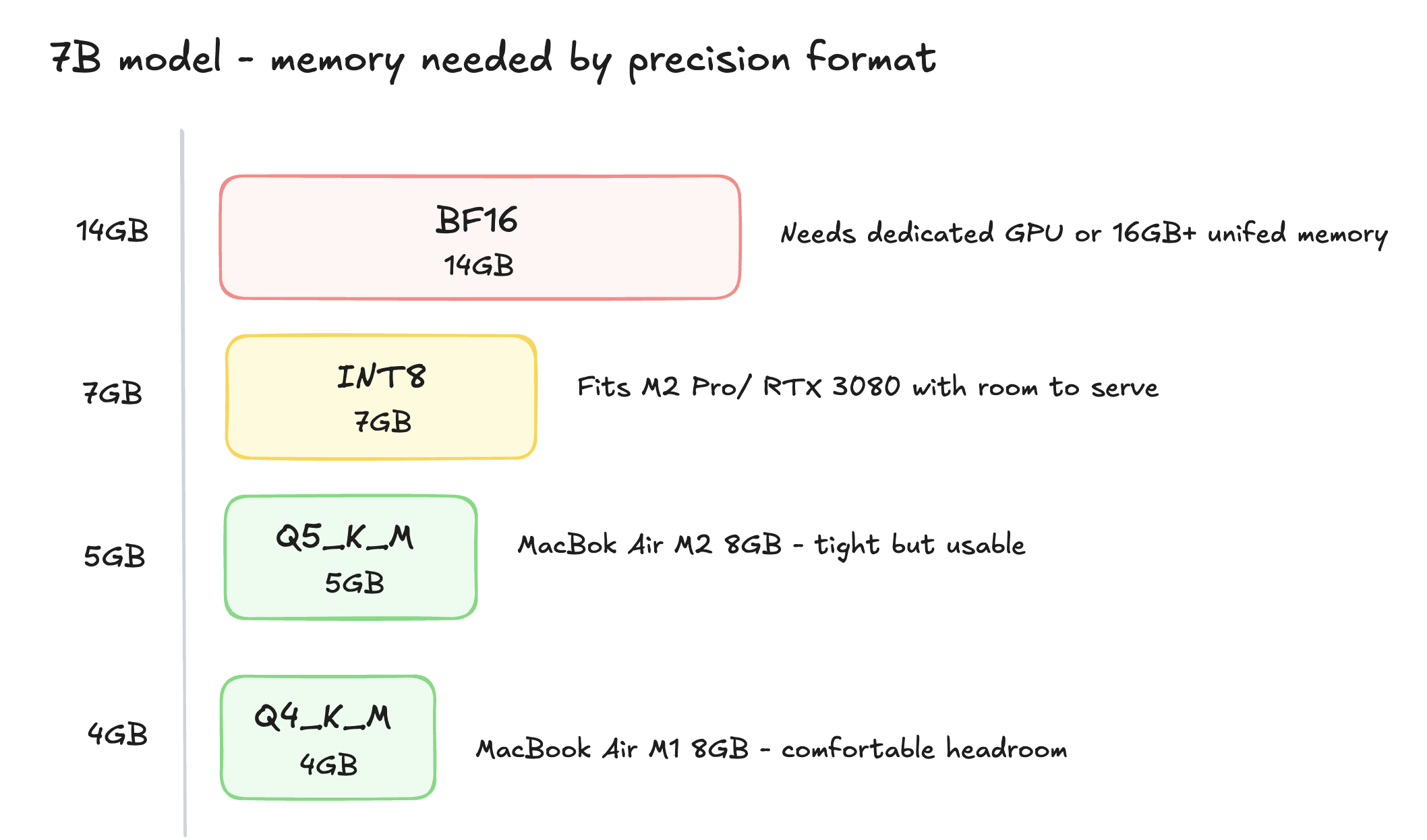
BF16 stores each weight in 16 bits. It's the standard for most frontier and open weights models. A 7B parameter model in BF16 needs roughly 14GB of GPU memory as the baseline.
Quantisation reduces that precision. INT8 cuts each weight to 8 bits, half the memory, roughly 7GB for that same 7B model. INT4 cuts it further to 4 bits, roughly 3.5GB. The model gets significantly smaller. The question is what you lose in the compression.
With the compression, you lose information. Each weight gets rounded to fit into fewer bits. For most tasks at most model sizes, the rounding is small enough that the output quality barely changes. For some tasks such as complex reasoning, precise instruction following, tasks where the model is already near its capability ceiling, the rounding matters more in this scenario.
This plays out differently depending on where you're running the model.
For individuals running locally, on an M-series Mac, a gaming GPU, a consumer machine, quantisation is often the difference between running a model at all or not. A 7B model in BF16 needs 14GB of memory. In Q4 it needs roughly 4GB. That's the difference between needing a dedicated GPU and running it comfortably in unified memory on a MacBook Air.
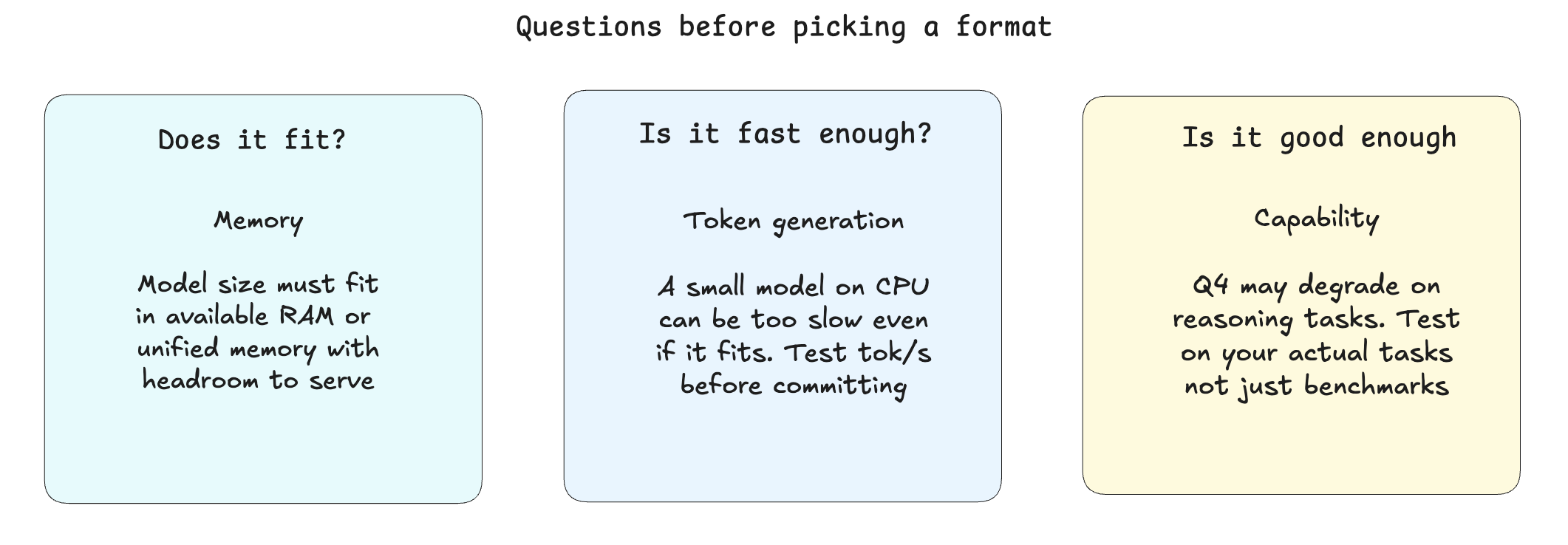
The practical question for local deployment isn't just "how small can I go." It's three things together:
does the quantised model fit in my available memory,
does it generate tokens fast enough to be usable, and
does it preserve enough capability for the tasks I actually need it for?
Token generation speed matters more than people expect. A heavily quantised small model running on CPU can be painfully slow even if it fits in memory. GGUF formats, popularised by llama.cpp, are designed specifically for this: quantised models that run efficiently on CPU and Apple Silicon, balancing size, speed, and quality in a format built for consumer hardware.
Q4_K_M and Q5_K_M are the most common sweet spots for local use. Q4_K_M is small and fast and also good for most conversational tasks. Q5_K_M is slightly larger and preserves more of the model's capability, worth it for reasoning-heavy tasks where you can feel the quality floor.
This is the trade-off most teams miss.
Quantisation doesn't degrade all tasks equally. A model handling simple classification or summarisation often loses nothing measurable going from BF16 to INT8. The same model handling multi-step reasoning or precise code generation may show real degradation at INT4.
The failure mode is applying quantisation uniformly without understanding the task. A feature routing 80% routine requests and 20% complex ones might survive INT8 on the routine path and need full precision on the complex one.
W4A16 is a useful middle ground, weights quantised to 4 bits, activations kept at 16 bits. You get much of the memory saving without the most aggressive rounding on the computation itself. This is what I used when I ran GPTQ on Qwen3-0.6B. The perplexity hit was 8.1%, noticeable but manageable for a model that small under aggressive compression.
When the trade-off is yours to make.
If you're calling a hosted API the decision is abstracted as you don't control it.
It becomes yours in three situations.
Running models locally: Whether you're an individual with a MacBook or a team evaluating on-device deployment, you're choosing the format. GGUF for CPU and Apple Silicon, GPTQ or AWQ for GPU. The right choice depends on your hardware, your task, and how much quality degradation you can absorb.
Deploying open weights on your own infrastructure: Sovereign AI, self-hosted, edge deployment; same decision, higher stakes. Memory constraints often make quantisation a prerequisite rather than an optimisation.
Evaluating cost at scale: A feature running at 100,000 daily requests on a full-precision model might run on half the hardware at INT8 with no measurable quality difference. For example, If you haven't tested that, you may paying for precision you don't need.
The question to ask before picking a model format.
Does this quantised model fit in my available memory, generate tokens at a usable speed, and preserve enough capability for the tasks I'm actually running?
If you can answer all three, you're making an informed precision decision. Most people may not care, they either run full precision because they don't know the alternative exists, or they grab the smallest GGUF they can find and wonder why the quality dropped.
About the author
- I lead the strategy and delivery of products and systems that solve real problems, support commercial goals and scale across teams and markets. My work spans platform foundations, user-facing experiences, commercial tools and developer products, and I adapt my approach to the needs of each domain. My experience covers early-stage, scale-up and enterprise product environments, combining hands-on delivery with team leadership and award-winning work recognised across several innovative organisations.
Comments
Join the discussionNo comments yet. Be the first to comment.